

In today’s fast-paced digital world, businesses handle thousands of files, contracts, reports, and internal records daily. Managing these documents manually or through disorganized cloud folders often leads to lost files, security vulnerabilities, and wasted hours searching for information. This is where a robust Document Management System (DMS) becomes indispensable.
One of the leading enterprise-grade solutions available today is LogicalDOC. Designed to store, organize, index, and secure critical digital assets, LogicalDOC helps organizations transition toward a paperless, efficient workflow. In this comprehensive guide, we will explore what LogicalDOC is, its core architecture, top features, deployment options, and how it compares with other document management tools in the market.
What is LogicalDOC?
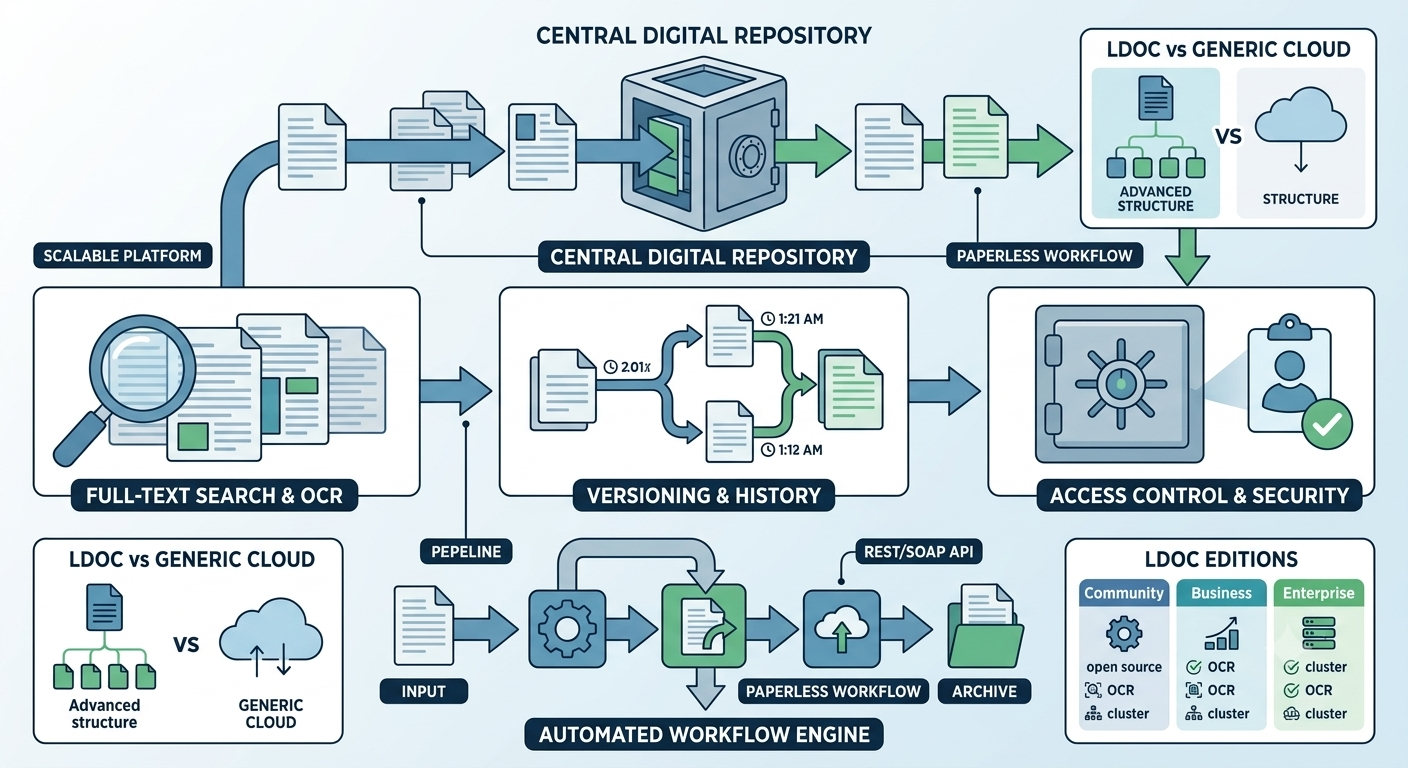
LogicalDOC is an advanced, high-performance web-based Document Management System (DMS) built to help organizations manage digital content automatically and securely. It acts as a central repository for all your company’s files, enabling teams to store, retrieve, modify, and track documents effortlessly.
Unlike traditional folder-based storage systems, LogicalDOC utilizes full-text search capabilities, metadata tagging, version control, and automated workflows. Whether you are a small business looking to organize customer invoices or a global enterprise managing sensitive legal documentation, LogicalDOC offers a scalable platform tailored to modern business requirements.
Why Modern Businesses Need a DMS Like LogicalDOC
Before diving into the technical features of LogicalDOC, it is essential to understand why traditional file management methods fail in professional environments:
- Information Silos: When employees store files on local hard drives or individual cloud accounts, team collaboration becomes fragmented.
- Version Chaos: Multiple people editing copies of the same document leads to confusion regarding which version is final or accurate.
- Security Risks: Unrestricted access to sensitive company files increases the risk of data leaks and non-compliance with privacy regulations.
- Time Loss: Finding a specific document based on a phrase or hidden parameter can take hours without full-text indexing.
LogicalDOC addresses each of these pain points by centralizing documents within a secure, indexed, and accessible web interface.
Key Features of LogicalDOC
1. Advanced Full-Text Search and Indexing
LogicalDOC incorporates powerful indexing engines that read the actual content inside files—such as PDFs, Microsoft Word documents, Excel spreadsheets, and scanned images (via Optical Character Recognition or OCR). Users can find documents instantly by entering a single keyword, phrase, or metadata field.
2. Document Versioning and History Tracking
Every time a user updates or modifies a document, LogicalDOC automatically creates a new version while keeping the complete version history intact. This ensures that you can review past edits, track who made specific changes, or restore a previous version whenever necessary.
3. Granular Access Control and Security
Data security is a major priority for enterprise document management. LogicalDOC provides Role-Based Access Control (RBAC). Administrators can assign specific permissions (read, write, delete, download, or share) down to individual users, groups, or document folders, ensuring sensitive information stays protected.
4. Automated Workflow Engine
LogicalDOC includes an integrated workflow manager that allows organizations to automate document routing. For example, when an invoice is uploaded, the system can automatically send a notification to a manager for approval, record their digital sign-off, and archive the file once approved.
5. Seamless API Integration and Extensibility
For companies using CRM, ERP, or custom software solutions, LogicalDOC offers robust RESTful and SOAP Web Services APIs. This makes it simple to integrate document upload, retrieval, and search functions directly into your existing software ecosystem.
LogicalDOC Editions: Finding the Right Fit
LogicalDOC is available in multiple editions to cater to different operational scales and technical requirements:
A. LogicalDOC Community Edition (Open Source)
The Community Edition is free, open-source software built for smaller teams or developers who want a self-hosted DMS. It includes essential features like basic indexing, file uploads, metadata management, and a clean web interface.
B. LogicalDOC Business Edition
Tailored for growing enterprises, the Business Edition includes advanced capabilities such as OCR for scanned documents, Microsoft Office integration, automated email ingestion, and enhanced user access management.
C. LogicalDOC Enterprise Edition
Designed for large-scale enterprise deployments, this edition provides high-availability cluster support, audit logs, digital signatures, advanced workflow builders, and dedicated technical support.
Step-by-Step Implementation Strategy for LogicalDOC
Deploying a Document Management System requires thoughtful planning to ensure high user adoption and minimal workflow disruption. Follow these key steps for a successful LogicalDOC rollout:
[Phase 1: Needs Assessment] ➔ [Phase 2: Taxonomy & Folder Structure] ➔ [Phase 3: Deployment & API Setup] ➔ [Phase 4: Permission Mapping] ➔ [Phase 5: User Training]
FOR MORE INFORMATION CLICK HERE PUBLINZO
Phase 1: Assessment and Needs Analysis
Identify the core document types your organization handles (e.g., invoices, HR files, contracts). Determine who needs access to these files and which processes require automation.
Phase 2: Folder Taxonomy and Metadata Setup
Establish a clean folder architecture and define custom metadata fields. Adding tags like “Client Name,” “Document Date,” or “Status” makes future searches significantly faster.
Phase 3: Technical Installation and Deployment
Choose between an On-Premise deployment (installed on your own server infrastructure) or a Cloud-Based setup. Configure system dependencies, database connections, and storage paths.
Phase 4: User Group and Permission Assignment
Define clear user roles (Administrators, Managers, Editors, Viewers) and assign appropriate access levels across all document repositories.
Phase 5: Team Onboarding and Training
Provide comprehensive training for your team members to help them transition away from local storage habits toward LogicalDOC’s centralized platform.
LogicalDOC vs. Other Market Solutions
Choosing the right DMS often comes down to comparing feature sets, system demands, and ease of use. Here is a quick breakdown of how LogicalDOC compares to other common document platforms:
| Feature / Criteria | LogicalDOC | Generic Cloud Storage | Enterprise Alternatives |
| Primary Focus | Structured Document Lifecycle | Basic File Sharing | Complex Enterprise Content |
| Full-Text OCR | Yes (Built-in/Add-on) | Limited / Rare | Yes |
| Version Control | Automatic & Detailed | Basic | Complex |
| Custom Workflows | Built-in Workflow Builder | None | Advanced |
| Deployment | Cloud & On-Premise | Cloud Only | Cloud & On-Premise |
| Setup Complexity | Moderate & User-Friendly | Very Simple | High / Requires Consultants |
Best Practices for Maximizing LogicalDOC Efficiency
To get the best possible performance and organization out of LogicalDOC, consider adopting these standard industry practices:
- Standardize Naming Conventions: Encourage team members to use consistent naming formats for uploads (e.g.,
YYYY-MM-DD_DocName_v1). - Utilize Optical Character Recognition (OCR): Ensure OCR is enabled for scanned paper files so their contents remain searchable alongside digital native documents.
- Automate File Archiving: Set up retention policies to automatically move outdated or inactive records to long-term storage after a designated time frame.
- Regular System Backups: Protect your central repository by conducting routine scheduled backups of both the file storage directory and the database backend.
Final Thoughts
Transitioning to a structured document management framework is one of the most effective steps an organization can take toward operational efficiency, data security, and digital maturity. LogicalDOC provides a scalable, secure, and highly adaptable environment that turns disorganized file collections into an organized digital asset library.
Whether you start with the open-source Community Edition or deploy the full Enterprise package, LogicalDOC delivers the core tools needed to keep your business records structured, compliant, and accessible.